Menu
Healthcare Platform · UX · Product Design · Ireland
09

Trace

Year
2025
Role
UX Design · Research · Prototyping
Type
Patient Health Record App
Duration
7 Weeks

In Ireland, patients are their own healthcare record. Trace gives them somewhere to store it — a patient-owned platform bridging the public and private divide, with a consent-based way to share their full history with any clinician.

Context + Challenge
The Challenge

Ireland's healthcare system is split between HSE public and private providers, with no unified patient record. Scans get stuck between departments. Medication history is verbal. A €300 appointment can reveal an insurance gap the patient never knew existed. The patient is expected to carry their own health history in their head.

How Might We

How might we give patients a complete, private view of their own health history — across all providers — without requiring those providers to change their systems?

The Process
01
Research
DISCOVERY
02
Concept
IDEATION
03
Development
ARCHITECTURE
04
High Fidelity
DESIGN
05
Delivery
PROTOTYPE
Research + Discovery
This project started with four real moments.
Finding 01 · Personal Experience

This project started with four real moments.

A year-long waiting list with no tracking. A scan stuck between two departments. A €300 appointment where the doctor had incorrect family history. An insurance shortfall discovered only after the fact. These were not hypotheticals — they were the brief.

"The person who knows the least about your health history is often the doctor sitting in front of you."
Every existing tool solves one side of the problem.
Finding 02 · Competitive Analysis

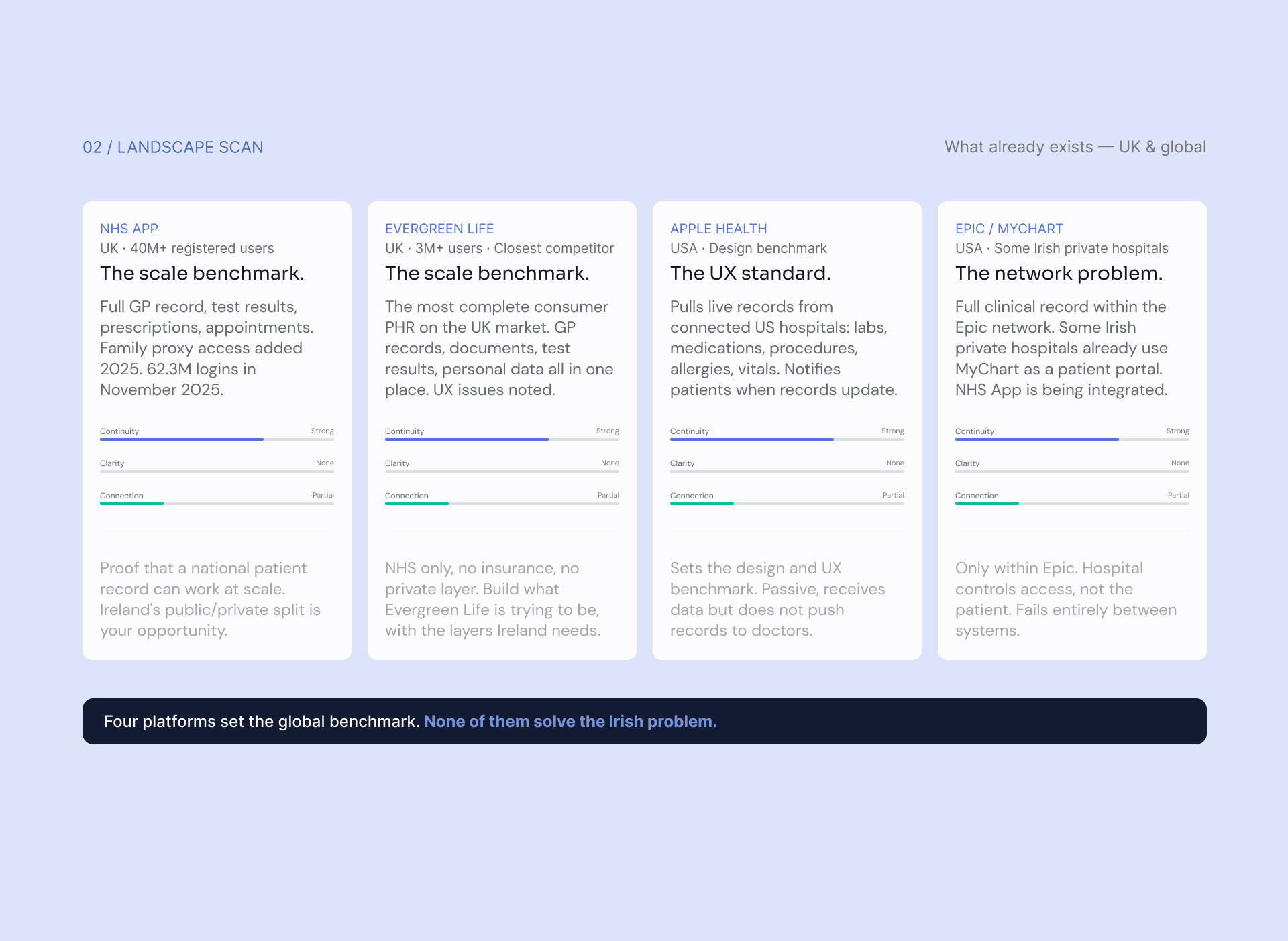
Every existing tool solves one side of the problem.

HSEapp covers public care. Insurance apps cover claims. Apple Health sets the design bar. None bridge Ireland's public-private divide. None give a patient a way to share their full record with a doctor who has never met them.

"Trace is the layer that connects them."
Design Direction
Constraints, not aspirations.
Five Design Principles

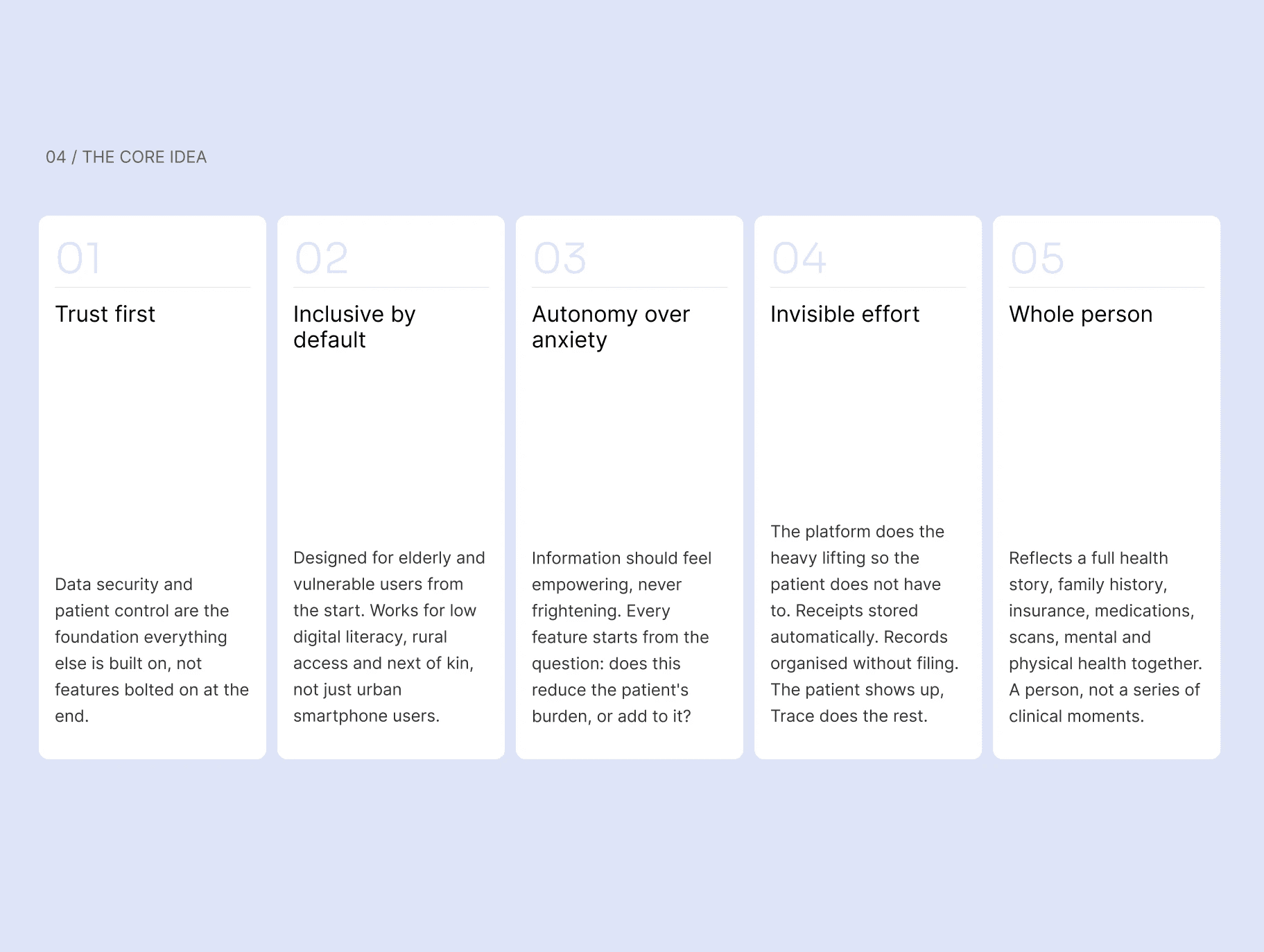
Constraints, not aspirations.

Trust first. Inclusive by default. Autonomy over anxiety. Invisible effort. Whole person. Every screen was measured against these — if a decision spent the user's trust rather than earning it, it was cut.
Doctor initiates. Patient approves.
The Consent Architecture

Doctor initiates. Patient approves.

The doctor opens trace.health/view in any browser — no account, no download. A 4-digit code is generated. The patient enters it on their phone, sees the doctor's name and clinic, chooses exactly what to share, and optionally allows session notes. The direction of the code is what puts consent at the centre.

"Like Spotify Connect — the device requests, and you approve on your own phone."

Upload screen →
Two Surfaces, One Record

Patient app and clinician portal.

The patient mobile app holds, adds to, and shares the record. The clinician portal at trace.health/view is read-only, entered only with a patient-approved session code, and shows only the sections the patient chose to share.

01
Doctor opens trace.health/view
Any browser, no account required. A 4-digit session code is generated and shown to the patient.
02
Patient enters code and approves
Sees the doctor's name and clinic, chooses full or summary access, optionally allows the doctor to write session notes.
03
Session opens — patient stays in control
Live sharing indicator on the patient's phone. They can see what the doctor is accessing and revoke at any moment.
User Flow — Happy Path

Doctor initiates.
Patient approves.

From first interaction to session end. The record stays private until the patient makes an explicit, informed choice.

Patient
Doctor
Handoff — information transfers between actors
01
Start
02
Code exchange
03
Consent
04
Live session
05
End
Patient
Opens Trace app
Taps Record tab
Receives 4-digit code
Enters code in Trace
Sees doctor identity
Chooses sharing scope
Approves ✓
Live dot — session active
Sees what's being accessed
Can revoke at any moment
Taps End session
Notes written to record
Log updated
Verbal handoff
Patient approves
Health data
Doctor
Opens trace.health/view
Enters name + clinic
Clicks Start session
4-digit code generated
Reads code to patient
Waiting for patient…
Health dashboard loads
Reviews record
Adds session notes
Dashboard inaccessible
Session token revoked

In every other concept, the patient initiates — so sharing happens before consent is explicit. In Concept B, the doctor initiates: the patient sees who is requesting and what they will see before agreeing to anything. The direction of the code is what puts consent at the centre.

Concept Exploration

Four sharing concepts.
One clear winner.

Each concept was assessed against the criteria that matter most for a consent-first health record. Concept B was the only one to score strongly across all six.

Concept A
Patient generates a 6-digit code and reads it to the doctor. Works anywhere, but consent is implicit — the patient commits before seeing any scope options.
Concept B ✦ Chosen
Doctor generates a 4-digit code at trace.health/view. Patient enters it on their phone, sees the doctor's identity, chooses scope, optionally allows session notes. Consent is explicit and directional.
Concept C
Patient generates a QR code for the doctor to scan. Fast, but solves phone-to-phone — not the phone-to-desktop flow a clinical setting needs.
Concept D
Patient holds their screen for the doctor to read. Zero friction, works offline, but unsuitable for complex histories. A last-resort fallback.
Evaluation Matrix
Concept A
Concept B ✦
Concept C
Concept D
Usability
Good
Strong
Fast
Minimal
Feasibility
Strong
Strong
Partial
Strong
Brief alignment
Strong
Strong
Partial
Partial
Explicit consent
Implicit
Explicit
None
None
Scope control
None
Full
None
None
Session notes
None
Yes
None
None
WHY CONCEPT B

Concept B was the only one that turns sharing into a deliberate consent decision. The patient sees who is requesting access and what they will see before sharing anything, not after. The direction of the code is what decides who controls consent.

User Flow — Happy Path

Doctor initiates.
Patient approves.

From first interaction to session end. The doctor initiates, the patient approves, and the record stays private until they do.

01
Start
User and doctor prepare
02
Code exchange
4-digit handoff
03
Consent
Patient approves the share
04
Live session
Doctor reviews the record
05
Session end
Access closes · notes sync
Patient
01Opens Trace appTaps the Record tab to view health record
02Receives 4-digit codeDoctor reads the code aloud or shows screen
03Enters code in TraceTypes 4 digits into the Clinician access screen
04Consent screen appearsDoctor name and clinic are shown
05Chooses sharing scopeFull dashboard or summary only
06Toggles notes · taps ShareOptionally allows doctor to write notes
07Active sharing indicatorGreen dot · doctor name shown · session live
08Full visibility · full controlCan see what doctor is accessing at any moment
09Taps End sessionSession closes immediately
10Notes confirmed · log updatedDoctor notes written to patient's record
Doctor
01Opens trace.health/viewAny browser · no login · no app required
02Clicks Start sessionName and clinic entered (shown to patient)
04Reads code to patientVerbally or shows screen across desk
05Waiting stateSpinner shown · waiting for patient to approve
06Health dashboard loadsCritical safety strip immediately visible
07Reviews recordConditions · timeline · medications · documents
08Adds session notesStructured notes if patient granted permission
09Dashboard becomes inaccessibleSession token revoked instantly
Mid-fidelity Wireframes

Structure before style.

Concept B refined into real screens and interactions before any visual design was applied. Every layout decision had to earn its place.

Patient App
11 wireframes
Patient wireframe 1
Patient wireframe 2
Patient wireframe 3
Patient wireframe 4
Patient wireframe 5
Patient wireframe 6
Patient wireframe 7
Patient wireframe 8
Patient wireframe 9
Patient wireframe 10
Patient wireframe 11
Sharing
Doctor identity first
The requesting doctor's name and clinic appear at the top of the consent screen, before any toggles or options.
Consent
Three scope options, equal
GP visit, Summary only and Decline carry equal visual weight. Declining is never discouraged or visually hidden.
Session
Dark bar = live session
When sharing is active the app bar turns dark navy with a pulsing dot — the changed state is obvious even in a clinical setting.
Medications
Refill bars, not dates
A proportional bar darkens as a refill runs low. Faster to read at a glance than parsing a date in a busy appointment.
Clinician Portal
8 wireframes
Clinician wireframe 1
Clinician wireframe 2
Clinician wireframe 3
Clinician wireframe 4
Clinician wireframe 5
Clinician wireframe 6
Clinician wireframe 7
Clinician wireframe 8
Entry
No account, no friction
One button. No registration, no download. The full flow is explained before the doctor starts so there are no surprises.
Trust
Code read across a desk
Large, bold navy digits, readable at arm's length so the doctor can show the screen to the patient without passing their device.
Dashboard
Provenance on every view
Source, scope and read-only status sit on every screen of the portal, not just the first. The patient is never forgotten.
Detail
Flagged values in context
Abnormal results are highlighted in the table so the doctor doesn't have to read every row. Critical safety is always surfaced first.
Design System

Every state defined
before any screen was built.

A complete UI kit across five categories — Actions & Forms, Navigation, Status & Feedback, Records & Data, and Cards & Containers — built before high-fidelity work began to keep consistency enforced from the start.

Buttons
Buttons
Primary, secondary, destructive and ghost variants across all states.
Input fields
Input fields
Text, email, date and search inputs with error, focus and disabled states.
Session Code Box
Session Code Box
The 4-digit code display for both the doctor portal and the patient app.
Toggles
Toggles
On/off, indeterminate and labelled — used throughout consent and settings flows.
Choice Cards
Choice Cards
The consent scope selector — GP visit, Summary only, Decline — with equal visual weight.
Note Field
Note Field
The structured session notes input on the clinician portal, if the patient allows it.
Final Screens

Patient app and
clinician portal.

Patient App
21 screens
Splash
Splash
App loads and restores session.
Log In
Log In
Returning patients sign in.
Create Account
Create Account
New patients set up a Trace account.
Verify Email
Verify Email
One-time code confirms the address.
About You
About You
Basic personal details for the profile.
Medical Basics
Medical Basics
Key health information captured upfront.
Privacy & Consent
Privacy & Consent
The patient sets how their data is used.
Share Profiles
Share Profiles
Presets for what different people can see.
Welcome
Welcome
Onboarding complete; the patient enters.
Home
Home
Dashboard: conditions, meds, visits.
Home · Appointment Day
A prompt to share the record appears.
Share · Preferences
Share · Preferences
Patient chooses exactly what to share.
Share · Code Ready
Share · Code Ready
A short code to give the clinician.
Share · Access Request
Patient sees and allows or denies it.
Share · Active Session
Patient can see access live, end anytime.
Share · Paused
Share · Paused
Record hides until the patient decides.
Share · Session Ended
Patient receives a log of what was viewed.
Health Record
Health Record
Allergies, conditions and visit timeline.
Medications · Expired
Past prescriptions, kept for history.
Medications · Current
Active prescriptions with full detail.
Profile
Profile
Identity, key details and care team.
Clinician Portal
5 screens
Patient Overview
Patient Overview
Key details, active conditions and recent activity.
Timeline
Timeline
Chronological view of appointments and events.
Medications
Medications
Current and past prescriptions, split clearly.
Documents
Documents
Letters and files, each in a read-only view.
End Session
End Session
Ending the session revokes access immediately.
Outcomes + Reflection
01
Surfaces designed — patient app + clinician portal
5
Assignments delivered across the module
2
Design principles guiding every decision
2
Sharing concepts explored and evaluated
What worked

Starting from lived experience gave the project a clear point of view that held all the way through to the final prototype — the brief never felt abstract.

The doctor-initiates consent model turned out to be more than a UX pattern. It became the product's core value proposition: the only concept where sharing is a deliberate consent decision.

What I'd do next

Build the full consent and session flow as a working prototype — including the live back-and-forth between patient app and clinician portal.

User research with older and lower digital-literacy patients to test the 4-digit code handoff in a realistic clinical setting.

Let's work together

I'm always open to a good project - or just a good chat

Aoife Randles - Portfolio 2026
Final Screens

Patient app and clinician portal.

01
01Screen name
All projects